Blue-white Light Transilluminator servicebio BWL-T100
$50.00
In stock
SKU
BWL-T100
Product Introduction
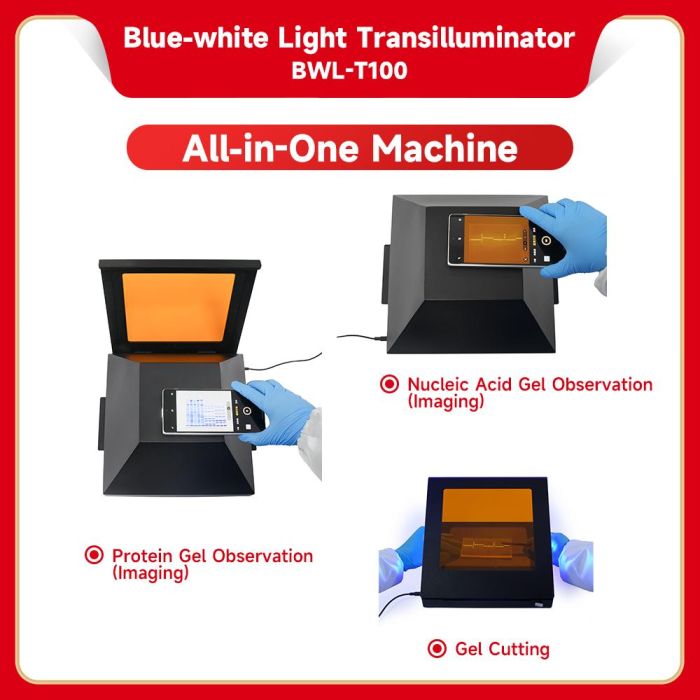
The Blue-white Light Transilluminator fulfills all your needs for both nucleic acid and protein gel visualization and imaging. With 3 adjustable brightness levels for both blue and white LEDs, it enables safe nucleic acid gel excision under blue light to protect both your samples and the operator. It serves as a compatible accessory for the Servicebio Gel Imaging System SCG-W1000 PLUS and Multi-functional Imaging System SCG-W5000 PLUS.
Product Parameters
| Product Name | Blue-white Light Transilluminator |
| Cat.No. | BWL-T100 |
| Light Source | Blue light: 470 nm, the brightness switches among 3 settings(Low, Medium, High)in a cycle with each button press White light:the brightness switches among 3 settings(Low, Medium, High)in a cycle with each button press |
| LED Durability | 20000h |
| Range of Illumination | 190X170mm |
| Dark Box | Used as a set, 270x270x160mm |
| Input Voltage | 12V |
| Input Current | 2A |
| Maximum Power | 24W |
| Dimensions | 265X260X40mm |
| Net Weight | 2.5Kg |
Body Description
Operating Procedure
1.Starting Up
Connect the AC adapter and the blue-white light transilluminator and plug into the socket, turn on the power switch and the white light starts.
2. Gel Transilluminating
2.1. Protein Gel
After turning on the machine, the white light illuminates (at low setting). Raise the cover of the orange filter (01), place the protein gel on the clear tempered glass (08), and observe the results;
If the white light is not bright enough, then press the white light power adjustment button (03). The white light will become brighter (at medium setting). Keep pressing, the white light power will be adjusted to the high setting. Keep pressing it again, and it will be restored to the low setting. This process will run with each press.
2.2. Nucleic Acid Gel
Press the blue light switch, the blue light illuminates (at low setting);
Lift the flip cover of the filter (01), place the blue filter and clear tempered glass (05 & 07) on top of the clear tempered glass (08), then put the nucleic acid gel on the clear tempered glass (05), close the flip cover of the orange filter, and observe the results.
If the blue light is not bright enough, then press the blue light power adjustment button (04). The blue light will become brighter (at medium setting). Keep pressing it, and the blue light power will be adjusted to the high setting. Keep pressing it again and it will be restored to the low setting. This process will run with each press.
3. Gel Cutting
Lift the orange filter (01) flip up 45 °, observe the nucleic acid gel through the filter, and cut the gel for recycling.
4. Picture Taking
For protein gel: Observe the protein gel under the transilluminator. If the visualization effect is appropriate, use a smartphone to capture the gel pictures.
For nucleic acid gel: Observe the nucleic acid gel under the transilluminator. If the visualization effect is appropriate, cover the gel transilluminator with the dark box, bring the smartphone camera close to the window on the top of the dark box, and take photos of the nucleic acid gel.
5. Cleaning Up
After the experiments are finished, turn off the power supply and clean up with a cloth.
6. Adjusting
If the orange filter cover becomes too loose or too tight when opening or closing, you can adjust the tension to an appropriate level using the provided tool (M3 hex key). (The tension is preset at the factory and should not require frequent adjustment. Adjustment may only be necessary after approximately 1–2 years of use.)